Let’s say you’re a travel blogger, roaming the back alleys of Paris
with your camera in hand. You’ve got some great content on your blog,
and hope that potential readers who search for cheese shops near Notre
Dame will discover your detailed, gastronomical post. Ah, but what about
your photos -- don’t you want them to be searchable as well?
Of course you do! Which is why you can now easily add "alt" and
"title" attributes to your images. To add these, click on an image in
your Post Editor, and select Properties. A text box
will appear where you can add "alt" and "title" attributes to your
image. "Alt" attributes are meant to be a description of the image for
users who are unable to view the image (due to reasons such as browser
compatibility or vision impairment), and the "title" attribute can be
used for providing longer descriptions about the image.
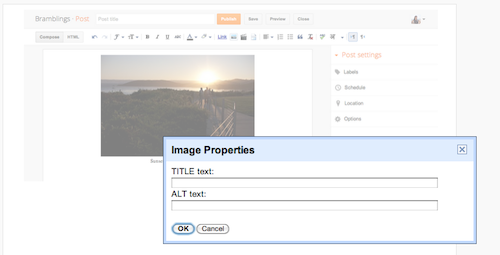
Once you edit "alt" and "title" in the Post Editor, you can switch to the HTML view to confirm the modifications you’ve made to your image tag.


No comments:
Post a Comment