Custom robots header tags allow you to tell web crawlers not to index certain sections of your site. It’s similar to customrobots.txt,
but not as granular. For example, if you check the box for "nofollow"
under the "Homepage" section, it means that you don’t want web crawlers
to consider any links on your homepage leading to any other page.
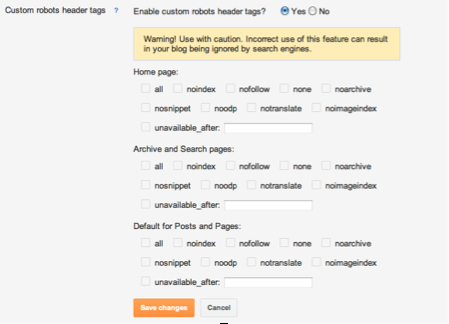
To enable these tags, go to Settings | Search Preferences, click Edit next to "Custom robots header tags," and select Yes.
The three sections you’ll see below correspond to:
- Your blog’s home page
- Your archive and search pages
- Your posts and pages
Check the boxes to set the flags according to your preferences, then
view the sections of your blog that you customized (home page, archive
and search pages, pages and posts). You should see an X-Robots-Tag
header tag in the HTTP response with the selected flags.
Note: In order to see the HTTP request and response with the
header tags, you’ll need to go to Chrome > View > Developer >
Developer Tools > Network > Headers for the HTML page request.
If the feature is turned on (e.g., you’ve selected Yes), then you will see a similar interface in the "Post Settings" section of the Post Editor.


No comments:
Post a Comment